Network Communication
Hardware Setup
- Network cable
- Router (select based on customer requirements)
- Mainboard and PC on the same network or directly connected
Network Configuration
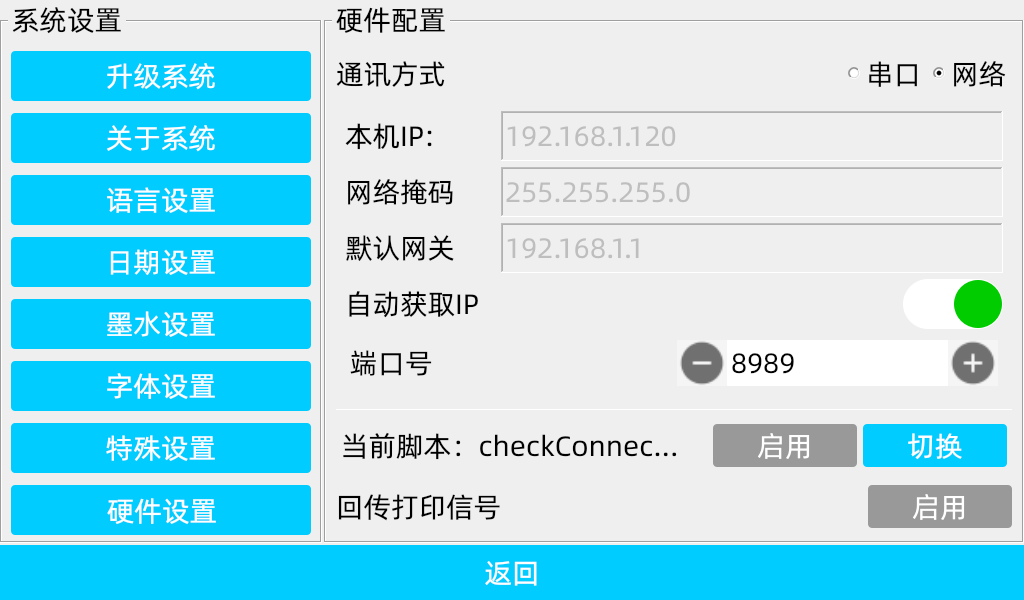
In the board’s Settings → Hardware Settings, select Network as the communication method:
- Router mode: When connected to a router with DHCP, use Auto Obtain IP for configuration
- Direct connection: When directly connected to a PC, configure the IP address manually
The board must be restarted after network parameter changes.
Data Exchange Examples
- Configure network parameters on the board and restart; load and enable the corresponding Lua script
- Download software that supports network data transfer (e.g.,
Bittlyon Linux)

- Set the network protocol, board IP address, and communication port
- Send data frames ending with
\r\n; canvas objects bound to registers update
Connection Methods
| Method | Description |
|---|---|
| Via router | Board obtains IP automatically; PC communicates with the board on the same subnet |
| Direct cable | Manually configure board and PC with IPs on the same subnet |
Notes
- The board must be restarted after network parameter changes
- The communication port must match the board configuration
- Data frames must end with
\r\n